

Lilikoi Juice
I do all my own graphics!
I'm not sure if this is already known but even though you unclick the "Share on Google+" button when making comments, it might still be shared publicly on your Youtube and Google + public feed that you made an activity on that video if you have a "Public" circle selected; even if you have comment feeds off under your Youtube settings--I do.
=============================================
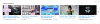
Tasha Green and and Tommy's video are ones I commented on which I unclicked "Share on Google +", but as you can see, its activity (that I did something or visited the video) has shown up on my feed playlist on my main channel page.
=============================================



Oddly enough, this only shows up if you have it as a playlist on your main channel page. You can see that if you click on recent activities either through its title (in blue) or via drop-down under the home screen (underneath your banner and name), it will not show.
So, I hope you haven't roamed around leaving strange comments on horse manure tutorial videos like I did. (That was a joke)
=============================================
SOLUTION
=============================================

Google requires that you share your comments with a circle for some odd reason... You cannot not select a circle to post with (A yellow warning pops up as seen above).
===============================================
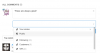
If you wish to make a comment and not share that activity, you must unclick "Share on Google+" and select a circle that is "private". As far as I understand, this means that you must select a circle that has no one in it. I chose VIP in this case.
===============================================

After you select your private circle you can comment as usual. Afterwards you will notice that next to your comment it says "Shared Privately".
===============================================
I just made that comment about 7 minutes ago, and you can see that it is now not visible on my main channel page activity feed.
This should keep your comment activities from being shared.
Something to keep in mind is that you cannot un/select circles while on most mobile devices, so if you make any comments on your phone, although you have the option to unclick "Share on Google+" it will be shared on your Youtube activity playlist and Google+ public circle feed.
=============================================
Tasha Green and and Tommy's video are ones I commented on which I unclicked "Share on Google +", but as you can see, its activity (that I did something or visited the video) has shown up on my feed playlist on my main channel page.
=============================================
Oddly enough, this only shows up if you have it as a playlist on your main channel page. You can see that if you click on recent activities either through its title (in blue) or via drop-down under the home screen (underneath your banner and name), it will not show.
So, I hope you haven't roamed around leaving strange comments on horse manure tutorial videos like I did.
(That was a joke)=============================================
SOLUTION
=============================================
Google requires that you share your comments with a circle for some odd reason... You cannot not select a circle to post with (A yellow warning pops up as seen above).
===============================================
If you wish to make a comment and not share that activity, you must unclick "Share on Google+" and select a circle that is "private". As far as I understand, this means that you must select a circle that has no one in it. I chose VIP in this case.
===============================================
After you select your private circle you can comment as usual. Afterwards you will notice that next to your comment it says "Shared Privately".
===============================================
I just made that comment about 7 minutes ago, and you can see that it is now not visible on my main channel page activity feed.
This should keep your comment activities from being shared.
Something to keep in mind is that you cannot un/select circles while on most mobile devices, so if you make any comments on your phone, although you have the option to unclick "Share on Google+" it will be shared on your Youtube activity playlist and Google+ public circle feed.
Last edited:


