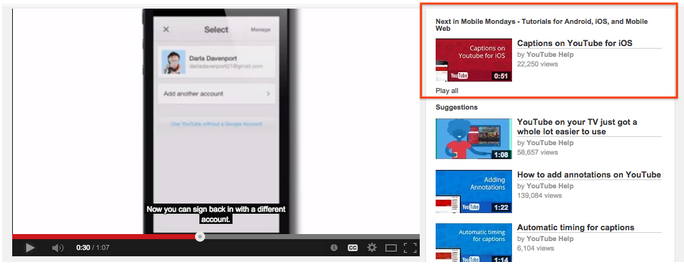
Where is Related Videos?

zekikaynak

Well-Known Member
Hello Everyone..

I have open my channel about 2-3 week ago and a few day ago I was make a new video and upload it and I did all settings about keyboards, tags, description etc. But when I look video related videos are not come. Only 3-5 video unrelated to each other. Fox can I fix this what the wrong?
 
You don't get to change the Related Videos...that's done by an algorithm created by YouTube/Google. However, you can make your videos show up together, so when someone clicks on one, they'll see the next in the series. It's called a "Series Playlist." Here's what YouTube has to say about it:

A series playlist allows you to mark your playlist as an official set of videos that should be viewed together. Adding a video to a series playlists allows other videos in the playlist to be featured and recommended when someone is viewing a video in the series playlist. YouTube may use this information to modify how the videos are presented or discovered.

1m8Muh8OVKmNH5wdGQKCobPfv-opM92a2w0h2I7o7jy42DdUJ9UfZZS3hxxlNVk5LMXz9vdSLw=w684


There are a few things to remember when using series playlists:

  • You must have a verified account in order to use series playlists.
  • A video cannot appear in more than one series playlist.
  • Only videos uploaded by you and that you have the rights to can be added to a series playlist.
To enable a series playlists, visit playlist settings while on your computer and check the box “Set as official series for this playlist”.
 
You don't get to change the Related Videos...that's done by an algorithm created by YouTube/Google. However, you can make your videos show up together, so when someone clicks on one, they'll see the next in the series. It's called a "Series Playlist." Here's what YouTube has to say about it:

A series playlist allows you to mark your playlist as an official set of videos that should be viewed together. Adding a video to a series playlists allows other videos in the playlist to be featured and recommended when someone is viewing a video in the series playlist. YouTube may use this information to modify how the videos are presented or discovered.

1m8Muh8OVKmNH5wdGQKCobPfv-opM92a2w0h2I7o7jy42DdUJ9UfZZS3hxxlNVk5LMXz9vdSLw=w684


There are a few things to remember when using series playlists:

  • You must have a in order to use series playlists.
  • A video cannot appear in more than one series playlist.
  • Only videos uploaded by you and that you have the rights to can be added to a series playlist.
To enable a series playlists, visit playlist settings while on your computer and check the box “Set as official series for this playlist”.


Thanks for respond @xingcat

My account is already verified account but my mean not my playlist. My video about Mission Impossible facts. Normally when people watch this need to see other channels videos about Mission Impossible on right side is it correct? But look 2 video from my channel and 5 video unrelated to each other. I wonder this..

Untitled_1.jpg
 
Again, it's not your call as to what shows up in "Related Videos." If these are new videos you've uploaded in the past month or so, it may not even register with Google that your video is about this subject, or that it has a high enough ranking (tags, links, keywords, etc.) to generate that.

I started posting videos about long hair for men in January, and it wasn't until April or so that the other videos I knew were about the same subject and by guys similar to me showed up on that sidebar. Consistently tagging your videos, putting them into playlists that are all on a theme, creating playlists of other creators who have similarly-themed channels...this can all pull your content into the search and feature algorithms much more quickly.
 
In fact, nowdays i 've seen lots of people are talking about SEO and channels optimization and i would like to know more about that area if somebody can in-lighting us ? Thank you xingcat :) because you had touched upon that area of high enough ranking (tags, links, keywords, and all SEO factors etc.), i always thinking on the mechanism and algorithm of YouTube SEO (Search Engine Optimization) system.

i would like to ask: what if all you-tubers have publish videos having same title, category and with similar SEO settings (including, tags and keywords, titles and descriptions ), then the search-results priority will given to whom if all videos are 100% optimized ? I know the probability of this happening might be zero %, but this the way i understand it anyway ! :)
 
Last edited:
I've notice the related videos section changing as my youtube career progresses.... at first all my videos popped up on the side.... but now it'***** or miss.... idk what google is doing....
 
what if all you-tubers have publish videos having same title, category and with similar SEO settings (including, tags and keywords, titles and descriptions ), then the search-results priority will given to whom if all videos are 100% optimized ?
According to everything we know now, it's the video with the highest (session) watch time.

at first all my videos popped up on the side.... but now it'***** or miss.... idk what google is doing....
I know right. I uploaded a video yesterday and none of my other videos are in the suggested column. I hope it's a glitch and not that YouTube has decided that my videos aren't "good enough" :confused:
 
Back
Top