Best video settings for a DSLR?

Great stuff - nice little setup. If you every consider upgrading your sound department, have a look at shotgun mics. You need an external recorder though so everything gets a little pricey!

James.
 
Great stuff - nice little setup. If you every consider upgrading your sound department, have a look at shotgun mics. You need an external recorder though so everything gets a little pricey!

James.


Thanks, in the future I might :)

Excited to film tonight. Hopefully it will be stress free lol.

Do you think its worth me filming like a few minutes worth of stuff, uploading it to iMac and see what its like, before I film the whole lot?
 
Absolutely. Do a few test shots to perfect your settings. To be honest, just watch bits back on the camera LCD. You can get a good enough idea for quality on there. I'd do a number of visual tests until you get the right look. Then make sure you write down all the settings and number you were happy with so you can instantly start recording the next time.

James.
 
Absolutely. Do a few test shots to perfect your settings. To be honest, just watch bits back on the camera LCD. You can get a good enough idea for quality on there. I'd do a number of visual tests until you get the right look. Then make sure you write down all the settings and number you were happy with so you can instantly start recording the next time.

James.


Will do, thanks mate :)

Its just you cant really test audio watching it back on LCD screen?
 
Its just you cant really test audio watching it back on LCD screen?

If you're using the Rode Video I can only image the sound you get back from the camera is in fact from the plug-in mic. I may be wrong on that. Plus I know the speakers aren't all that great. But for testing visuals it will probably save a bit of time from having to transfer files to a Mac every time. It's totally dependant on how you're comfortable working. You'll work in what ever ways you find more efficient and practical for you.

James.
 
If you're using the Rode Video I can only image the sound you get back from the camera is in fact from the plug-in mic. I may be wrong on that. Plus I know the speakers aren't all that great. But for testing visuals it will probably save a bit of time from having to transfer files to a Mac every time. It's totally dependant on how you're comfortable working. You'll work in what ever ways you find more efficient and practical for you.

James.


So I set the lens to Manual?

On the toggle (dial) I have that on manual?

How do I change the iso etc?

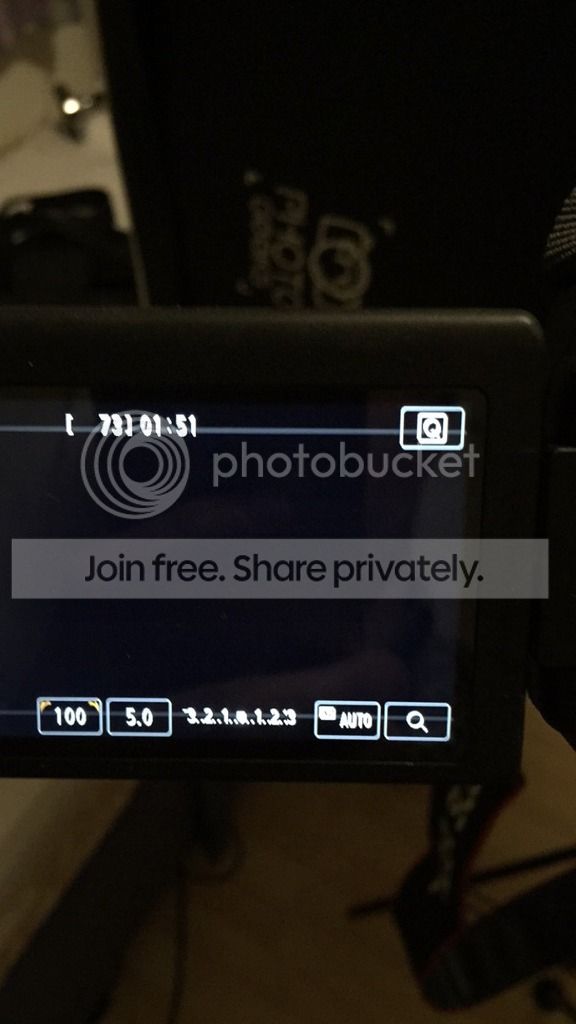
I have got to this screen

image_2.jpeg
 
On your camera do you have a video mode on the dial or is there a separate switch?

If you have a video mode on the dial, select that then set exposure to manual in the video menu. If it's a switch on the top to select video, the dial should be on 'M'.

Also yes the lens should be on manual focus.

James.[DOUBLEPOST=1452794199,1452793676][/DOUBLEPOST]Just seen a pic. You have a separate switch. Push the 'on' switch one further to video mode. Then set the dial to 'M'.

You can now set ISO, Shutter and Aperture. On your screen Shutter is far left, Aperture is next in, ISO on far right. From left to right they should read (roughly) 50, 3.5, 100.

James.

 
Ho
On your camera do you have a video mode on the dial or is there a separate switch?

If you have a video mode on the dial, select that then set exposure to manual in the video menu. If it's a switch on the top to select video, the dial should be on 'M'.

Also yes the lens should be on manual focus.

James.[DOUBLEPOST=1452794199,1452793676][/DOUBLEPOST]Just seen a pic. You have a separate switch. Push the 'on' switch one further to video mode. Then set the dial to 'M'.

You can now set ISO, Shutter and Aperture. On your screen Shutter is far left, Aperture is next in, ISO on far right. From left to right they should read (roughly) 50, 3.5, 100.

James.


How do I switch between the ISO and Aperture?[DOUBLEPOST=1452806601][/DOUBLEPOST]
Ho


How do I switch between the ISO and Aperture?


The aperture is at 4.5 but not sure how I change that? Switch between the 2. Can it go lower?
 
Providing you're on manual mode you change each of settings by doing the following:

1. Aperture
Hold down the 'AV' button and scroll the wheel on the top of camera.

2. ISO
Press the 'ISO' button on the top of camera and make a selection.

3. Shutter
Simply scroll the top wheel on top without touching another other buttons.

As I mentioned, I don't believe you'll get lower than about 3.5 aperture with your kit lens. Also try not to push your ISO any higher than 200 or you'll start to see video noise as the image degrades. Remember your shutter speed should sit comfortably at 50.

After setting these numbers, you may find that the image is too bright, or too dark. This is called over and under exposure. If it's too dark, you will now understand why you'd use your 50mm lens. That 1.8 aperture gives you more scope as it provides A LOT more light down the lower end of the aperture scale. If you're using the kit lens and it's under exposed, you'd have to push the ISO up to get a nicely lit image. As I mentioned this comes at a cost as you'll get video noise.

Is this starting to come together lol? It will click I promise. Once the penny drops and you suss out the connection between all these settings you'll be golden.

James.
 
Back
Top